
DmPlay Registration Guide
Learn how to review the DmPlay registration screen, understand its fields and protect your personal information before creating an account.
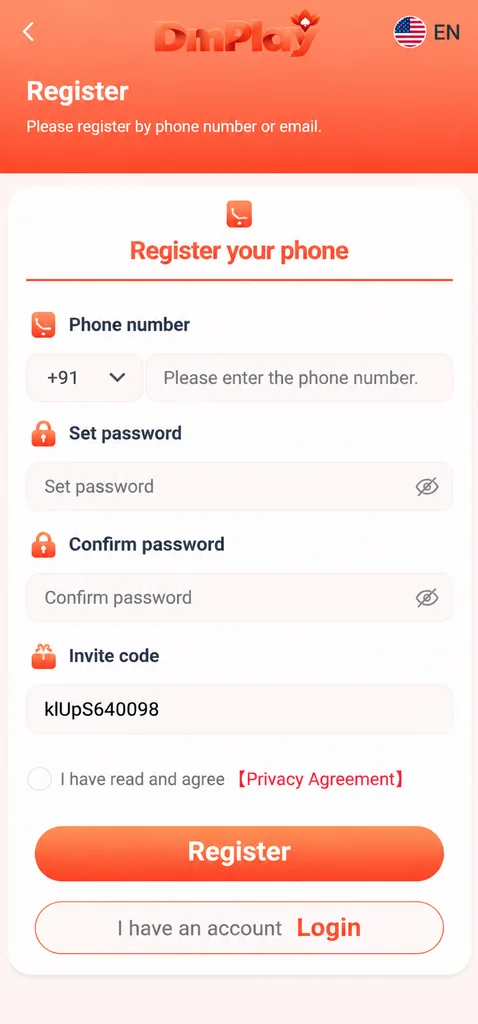
The registration screen shown in the supplied reference includes phone-number registration, password and confirmation fields, an invite-code field and a privacy-agreement checkbox. The exact fields and availability can change, so treat this as an explanation of the displayed interface—not a guarantee that every user will see the same form.
For more general DM Play and DmPlay Register information, visit the main DmPlay guide on the Home Page.
Before You Start
First, check that you are on a website address you have independently verified through a trusted provider channel. A familiar logo, search result or forwarded message is not proof that a page is genuine.
Read the service terms, privacy information, age and location requirements before entering personal details. Do not continue if the rules are unclear or the activity is not permitted where you live. Never register using someone else's identity or payment information.
Understand the Registration Fields
The reference screen shows a country-code selector and a phone-number field. Enter only a number that belongs to you and that you are authorised to use. Check the country code and digits before submitting; an incorrect number can prevent you from receiving account notices or verification messages.
The form also shows a password and confirm-password field. Use a unique password that you do not reuse on email, banking or social accounts. The confirmation field is there to help you catch typing mistakes. Do not share your password with anyone claiming to be support.
An invite-code field is visible in the reference image. Whether it is optional or required depends on the current form and provider rules. Do not use a code from an unknown person just because they promise a reward.
Review the Agreement Before Submitting
The screen includes a checkbox beside a privacy-agreement label. Open and read the relevant terms and privacy policy rather than treating the checkbox as a formality. Look for information about account eligibility, data use, promotions, payment conditions, restrictions and account closure.
Only submit details when you understand what you are accepting. If you cannot find clear terms, stop and verify them through the provider's independently confirmed contact route.
After Registration: Protect the Account
Keep your password private and secure the phone number or email used for account access. If a verification code is sent, enter it only into the verified sign-in or registration page you opened yourself. No legitimate explanation requires you to tell another person your one-time code or UPI PIN.
Avoid saving passwords on shared devices. Sign out when using a public or borrowed device, enable available security controls and watch for unexpected login notifications.
Common Registration Problems
If the form rejects a number, recheck the country code and number format. If password confirmation fails, retype both fields carefully and check any displayed password rules. If a page freezes, avoid repeated submissions that could create duplicate requests; reload only after confirming whether the previous attempt completed.
For account-specific errors, use a support channel that you have independently verified on the service provider's website. This guide cannot create, inspect or recover an account.
Registration Safety Checklist
Verify the website address, read the terms, use your own details, create a unique password and keep verification codes private. Do not share identity documents or banking details through social messages. If you are not an eligible adult or the activity is not permitted in your location, do not register.
Frequently Asked Questions
What information appears on the registration screen?
The supplied reference shows a phone number, password, confirm-password and invite-code field, plus a privacy-agreement checkbox. The live form may differ.
Should I share my OTP with a Telegram contact?
No. Keep one-time codes, passwords, UPI PINs and banking credentials private.
Can this guide register an account for me?
No. This is an independent information guide and cannot create or manage platform accounts.