
How to Withdraw Money on DmPlay
Understand the DmPlay withdrawal screen, review method labels and balance information, and recognise payment and account-safety risks.
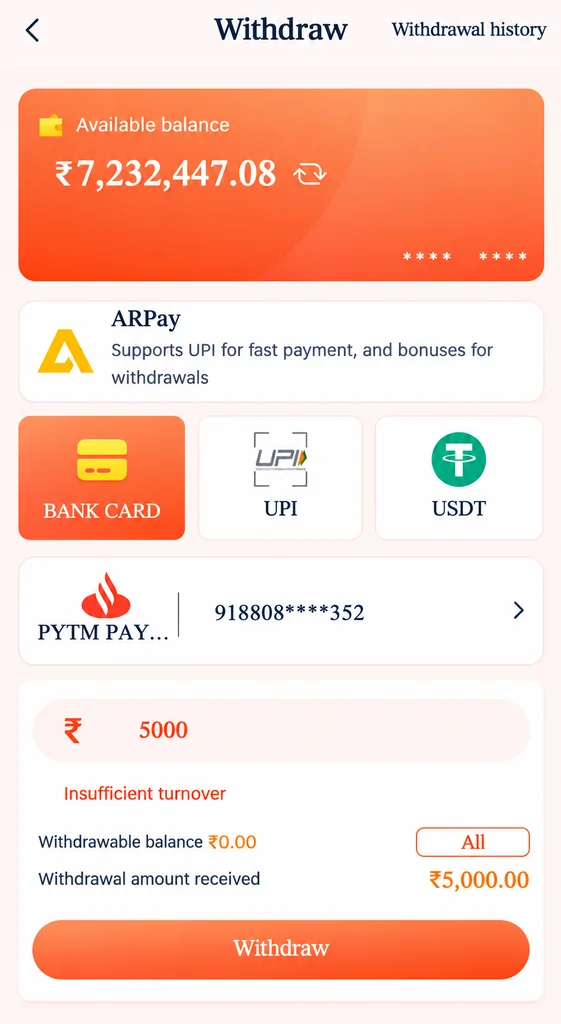
The supplied withdrawal screenshot shows an available-balance panel, an ARPay information tile, Bank Card, UPI and USDT options, a linked payment account and a withdrawal-amount area. The screen also displays an “Insufficient turnover” message. These labels describe the reference image; the current requirements and available methods must be checked with the provider.
For more general DmPlay withdrawal and DM Play information, visit the main DmPlay guide on the Home Page.
Understand the Withdrawal Screen
The screen displays an available balance and separate withdrawal-method options. A displayed wallet balance is not necessarily the same as the amount currently eligible for withdrawal. Review the provider's terms to understand any minimum amount, account-verification rule or transaction condition.
The reference includes Bank Card, UPI and USDT choices. Do not assume every method is available for every account or location. Method availability, limits and processing times can change.
Check the Linked Payout Details
Before requesting a payment, check that the selected bank account, UPI identifier or digital-asset address belongs to you and is correct. For crypto transfers, network and address mismatches can cause irreversible loss.
Never share your UPI PIN, bank password, card PIN, CVV or OTP with a person claiming to process a withdrawal. A legitimate support explanation should not require you to reveal these secrets.
What Does “Insufficient Turnover” Mean?
The reference screen displays the message “Insufficient turnover”. It suggests that the platform is showing a turnover-related condition, but the screenshot does not define the calculation, required amount or how it is applied.
Do not guess the requirement or deposit additional money simply because someone says it will unlock a withdrawal. Read the provider's current written terms and request a clear explanation through a verified channel. Keep a copy of the displayed message and relevant transaction references.
Review the Amount and Any Conditions
Check the requested withdrawal amount, minimum and maximum limits, verification status and any stated conditions before submitting. Look for fees, wagering or turnover terms, processing windows and restrictions in the provider's current documentation.
If a condition was not disclosed clearly, pause before sending more money or accepting a new offer. Do not rely on an unofficial agent's promise that a payment or bonus will guarantee a withdrawal.
If a Withdrawal Is Pending or Rejected
Check the transaction history and retain the request reference, date and status. A pending status may require the provider to review the request; do not repeatedly submit the same withdrawal unless the provider's verified instructions say to do so.
If rejected, record the exact error message and compare it with the published terms. Contact support using a route you have independently confirmed. Do not share passwords, OTPs, full bank details or remote-access codes.
Recognise Withdrawal Scams
Be cautious of anyone asking for an extra deposit, tax payment, release fee or security transfer to send your own balance. Do not pay a personal account or wallet based on an unsolicited message. Verify any genuine charge directly from the provider's published terms and your bank or payment service.
If you suspect fraud, stop communicating through the suspicious account, contact your bank or payment provider using its official channel and preserve relevant messages and transaction references.
Frequently Asked Questions
Does the available balance always equal the withdrawable amount?
Not necessarily. The reference separates available balance from other withdrawal details; check the provider's current eligibility rules.
What does insufficient turnover mean?
The screenshot shows this message but does not explain the exact calculation. Ask the provider for its written rule and do not deposit more money based on an unofficial promise.
Which withdrawal methods are shown?
The supplied image shows Bank Card, UPI and USDT options, plus an ARPay information tile. Current availability may differ.