
How to Add a Bank Account
Review the DmPlay bank-account form, understand the name, account number and IFSC fields, and protect your banking information.
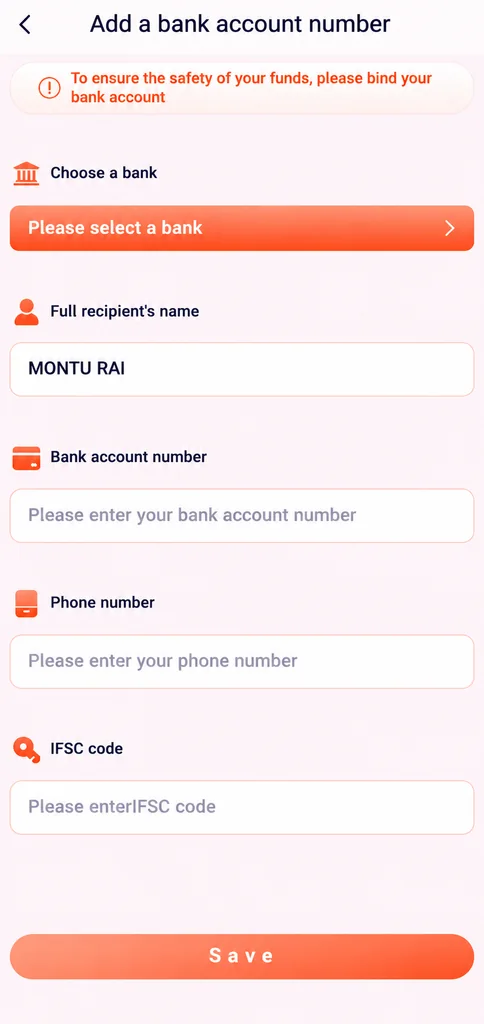
The supplied bank-account screenshot shows a bank selector and fields for the full recipient name, bank account number, phone number and IFSC code. The exact form and supported banks may change. This article explains the fields shown and the checks to make before submitting sensitive information.
For more general DmPlay bank account and DmPlay information, visit the main DmPlay guide on the Home Page.
Open Only a Verified Account Page
Bank details are highly sensitive. Open the account or wallet section only after verifying the website address through a provider channel you trust. Do not use a form sent to you in a forwarded message or through an unknown Telegram account.
Check that the page is encrypted and that the domain is spelled correctly. A padlock alone does not prove that the operator is genuine, so verify the address as well.
Choose the Bank and Check the Account Holder Name
The screenshot begins with a bank-selection control. Choose the correct institution only if it appears in the verified form. The recipient name should match the name associated with the bank account, subject to the provider's current rules.
Do not enter another person's bank details without their permission. If the service requires account ownership verification, read the policy and understand what evidence is requested before proceeding.
Understand the Account Number and IFSC Fields
The account-number field is for the bank account identifier, while the IFSC field identifies a bank branch in India's banking system. Enter information carefully and check every digit and character against your bank's own records.
The reference screen also asks for a phone number. Use only a number you control and understand why it is requested. Never put an OTP, UPI PIN, card PIN or internet-banking password into a normal bank-detail field.
Review Before Saving
Before submitting, review the bank name, recipient name, account number, phone number and IFSC code. A single incorrect digit can cause verification problems or payment delays. Do not rely on autofill without checking the values.
Submit only through a verified, secure page. Avoid public Wi-Fi and shared devices when entering bank information. Do not send screenshots that expose your full account number or other unrelated personal details.
If the Bank Details Are Rejected
Check whether the account-holder name and bank details match the bank's records, and confirm that the selected bank is correct. If the form displays a specific error, keep the wording but remove sensitive information before asking for help.
Use a provider support route that you have independently verified. This guide cannot verify account ownership, add a bank account for you or resolve a rejected bank-binding request.
Protect Your Banking Information
Never disclose UPI PINs, card PINs, OTPs, CVV codes, full passwords or remote-access codes. A person claiming to help with bank linking does not need these secrets.
If an unknown person asks you to install a screen-sharing app, approve a collect request or pay a fee to bind a bank account, stop and contact your bank through its verified channel.
Frequently Asked Questions
Which fields are visible in the bank form?
The screenshot shows bank selection, full recipient name, bank account number, phone number and IFSC code.
What is an IFSC code?
It is a code used to identify a bank branch for electronic payment routing in India. Check it against your bank's own information.
Should I send my full bank details to a Telegram contact?
No. Enter sensitive information only on a page you have independently verified and never disclose PINs or OTPs.