
How to Deposit on DmPlay
Understand the DmPlay deposit screen, review the payment labels shown in the reference and protect your money and payment credentials.
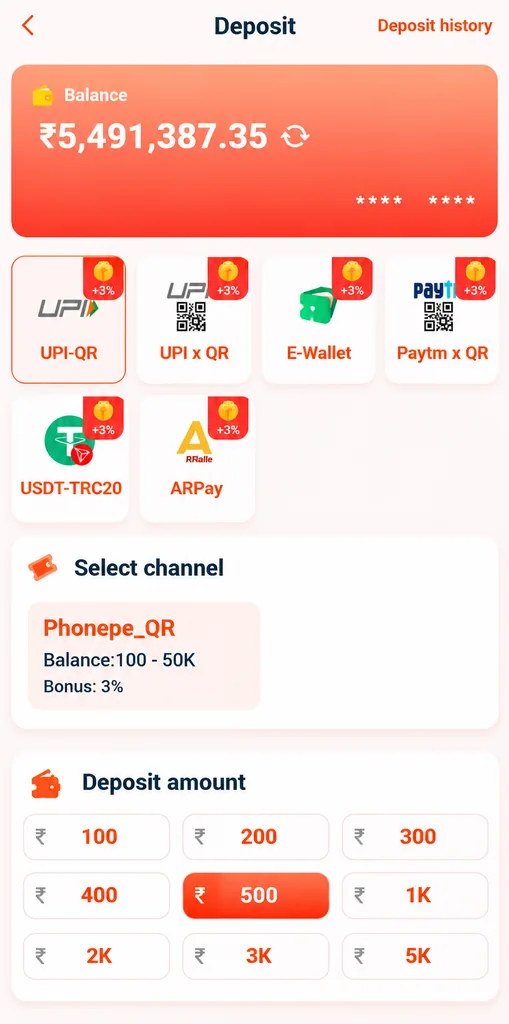
The supplied deposit screenshot displays several payment labels, including UPI-QR, UPI x QR, E-Wallet, Paytm x QR, USDT-TRC20 and ARPay, along with a channel selection and preset amounts. These are labels shown in the reference image, not a guarantee that every method is currently available or suitable for every user.
For more general DmPlay deposit and DmPlay information, visit the main DmPlay guide on the Home Page.
Understand the Deposit Screen
The reference screen separates payment-method tiles from a selected channel and an amount area. The method names, bonus labels, minimums and available channels may change. Always read the current terms and instructions displayed by the provider before taking any action.
Do not assume that a promotional percentage shown in an image is still active. Offers can have eligibility rules, deadlines, wagering conditions and withdrawal restrictions. A bonus is not the same as withdrawable cash.
Check the Payment Channel and Recipient
Before making a payment, verify the channel name, recipient details, amount and payment instructions using a provider website you have independently checked. A copied QR code or payment address from a chat message may send money to the wrong recipient.
Never transfer funds to a personal account because an unknown person says it is required to activate a wallet, release a bonus or fix a deposit. If the payee or instructions differ from what you expected, stop and verify them.
Review the Amount and Your Budget
Do not choose an amount because it is highlighted or presented as a recommended option. Consider your essential expenses first. Only spend money you can afford to lose, and choose zero when there is no spare entertainment budget.
Do not borrow, use rent or school fees, or use money intended for someone else. Do not make another deposit to recover an earlier loss or to qualify for a promotional offer.
Understand Payment Status
A payment app may show a completed, pending or failed status. Keep the transaction reference and check your own payment app or bank record. A platform balance display may update separately and can be delayed; do not assume that a screenshot alone proves settlement.
If the status is unclear, avoid repeated payments. Contact the provider through a verified support route and provide only the transaction reference and relevant status—not your UPI PIN, password or one-time code.
Protect UPI, Wallet and Crypto Details
A UPI PIN is used to authorise a payment; it is not required to receive money. Never share it with another person. Keep OTPs, bank passwords, card security codes and wallet recovery phrases private.
For digital-asset transfers, addresses and networks must match exactly. A transfer sent to the wrong network or address may be irreversible. Do not proceed unless you understand the risks and have verified the details independently.
Deposits and Responsible Play
Deposits into paid games carry a risk of loss. A deposit is not an investment and should not be treated as a way to generate income. Set a limit before participating and stop when that limit is reached.
For general guidance on spending limits and warning signs, visit the site's Responsible Gaming page. If you are not an eligible adult or the activity is not permitted where you live, do not participate.
Frequently Asked Questions
Which payment methods are shown in the screenshot?
The reference displays UPI-QR, UPI x QR, E-Wallet, Paytm x QR, USDT-TRC20 and ARPay labels. Current availability must be checked with the provider.
What should I do if a payment is pending?
Check the payment app or bank record, keep the transaction reference and contact a verified provider channel. Avoid sending a second payment until the status is clear.
Should I share my UPI PIN to confirm a deposit?
No. Never share a UPI PIN, password or OTP with another person.